Leaderboard



Popular Content
Showing content with the highest reputation since 05/28/2025 in all areas
-
Hi Guys, By request I put together a video showing my process for lighting a scene using Radiosity in A:M, hope it's helpful. Mike7 points
-
Thanks for all the comments guys, yeahh I like the topic of food and drink for an image contest great subject for still life. Finally uploaded my short to YouTube, after many months of hard work, I give you a whopping 1:4 minutes of distraction.7 points
-
Hi everyone, thought I'd share a thing I just made. It's an entry for the Syntax Demo Party 2025 here in Melbourne. Using AM v13, 7 render slaves, about a 24 hour render. I made the music on my Korg Triton with a couple of vintage reverb units. I love the Hash renderer, still looks like oldschool CGI6 points
-
Hi Guys, About 4 months ago I started working on a short animation (keeping up with the Mid Term Goals in my profile 😄 ) I'm getting close to posting the final video, so I might as well get the ball rolling. Will be posting some Time-Lapse videos here in the comings weeks as well. Cheers.
 5 points
 -
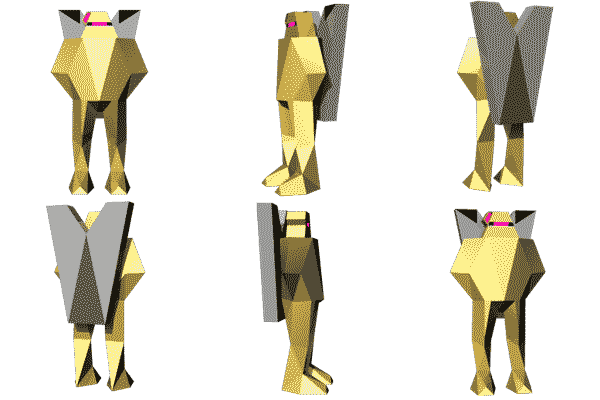
I thought of a use case for animation:master. A few years ago I started to trace mascots from old dos games to teach myself splines and patches. I worked off of downloaded images and game rips wherever i could find them. I've gotten a little better since i started and I wanted to share some of my work of late. the first batch of models were from 2 years ago. and the red boba fett looking guy is from this week
5 points
-
Thanks to RobCat for cajolling me out of hibernation. He is such a tireless hero of A:M! I sort of 'dropped-out' during covid... life got weird, as it does. After 35 years in TV graphics (started in film production as there was no computers...) and found A:M around 1997 after seeing a Greg Rostami demo at Siggraph in LA. Had a LOT of fun and always felt like AM was just a toy to be played with. I used it for many years professionally, and after covid and health setbacks I took a break from the business and just did other things and never really went back. I'd like to get back into 'playing' again now. I am inspired by the entries for the 'finish the...' cvontest. GREAT WORKS! I am poking around the forum, lots of memories, great people! Its been 5 years... I'm BACK!5 points
-
This is a long time personal project that I've had on my mind to write, script and animate. I finally put it together and It's a little awkward. I've used A:M to make low-fi "retro cgi" art, over the last few years. However, I think the software is very capable of making any variety of style or appeal. I've never done a video essay and it did not come naturally to collect my thoughts and lay them out like this. I'm glad i did anyway! The video essay on YouTube4 points
-
NY69_FinalCut_Sub-3_0000-1800.mp4 I created models, decals, actions, and set choreography in AM, then exported MDD data to apply particles, set camera position, lighting, rendering and Editing in Blender. Happy New Year 2026!
4 points
-
Hey everybody. the advent time is often pretty stressful. To make it a little funny from time to time, a little advent calendar. Each day a new door will be opened till 24th of December showing a small funny, heartful or just nice video clip to bring you a little joy in this pre christmas time. And if you wonder: Yes, the image is of cause done in Animation:Master. I wish you a beautiful pre christmas time and please remember to check in each day to open the new door of the day: https://advent.targomed.de/adventskalender.php?lan=en Best regards *Fuchur*
4 points
-
Happy Halloween Gang! Was able to do something with an unfinished model had kicking around on my hardrive just in time for Halloween. 👻
4 points
-
It's spline controllers... see? Rocky42_000.mp44 points
-
At long last... the results of the "Finish the Unfinished" Image Contest! See all the entries, hear the winners interviewed and, yes... The Big Scratch-Off! Congratulations to the medalists and a BIG THANKS to everyone who entered! Get yourself a soda, fire up the big screen and... FINISH THE UNFINISHED! There was more than one winner in the Big Scratch-Off... you'll have to watch it to know who you are! Send me a PM on the forum and I will arrange to PayPal you your winnings! @Shelton @johnl3d @Goss @Roger @ChuckGram @R Reynolds @Vance G @wedgeeguy @Michael Brennan @svetlik @createo @Madfox @Rodney @Tom4 points
-
Well done guys, great work.4 points
-
Wow, that was amazing. What a great essay. Those 'y2k CGI aliens' aren't dead, I'm working on a full length movie they feature in. Still using AM v13s, seven pc render farm, windows 7, no internet connection, no plugins, no subscriptions and most definitely NO AI. At all, none, not even upscaling, I'm rendering the whole thing 4k and most of it 16pass multipass at a few hours a frame. I'm only 30 mins in of 75min after six years of production with likely another 5-7 years to go. Also all orchestral music is done on 16 vintage roland synths and even using hardware reverbs and effects. Pretty much the most slow and tedious way of doing it but it's completely future proof so I can make movies until I die lol Don't get me started on people moving to Maya and other software, most of my team back in the 2000s constantly went on about moving to Maya or Soft Image or whatever. The funny thing is, my mate is also making his feature film but using Maya and Houdini and modern pipelines. He's constantly having licensing issues, can't open old models without renewing subscriptions and can only run one copy on one machine cause its too expensive to have more. And something even more funny, he was over the other day seeing my workflow on my old PC and I pressed play in the AM timeline; two shaded characters and a wireframe set, and an embedded reference video, started playing at the same time at atleast 30fps. his mind was blown "I can't do that" he said, I can only watch it realtime once I've rendered it. (That said, he's a pretty good artist and his film will be awesome.) The trick with AM is to lean into what it's good at, curvy lines with razor sharp edges, reflections (lots of reflections) and keeping things simple. I can't stand the look of modern CGI movies, some of them are completely unwatchable with ridiculous amounts of colours in every shot. And the lighting and surfacing is so real all you see are pimples and eyebrow hairs, it's distracting and unnecessary. I also hate all the animation as animators think they are actors, shoot video of themselves and act like they think animated characters move. The result is it's all the same, it's all shit, over arcing over animated mess. Ok, not all films but most of the slop that comes out now. Oops, sorry for the vent. Your video is very inspiring and makes me feel I'm on the right course and all the work is worth it. Thankyou! Dylan3 points
-
3 points
-
And here we have 11 instances...3 points
-
I just finished my first game jam! (community effort to make small games or demos in a short amount of time) The theme was to make anything that runs on pre-windows pc, a.k.a. runs in DOS. My idea was to make a pre-rendered game of click-able images and animations like in the game Myst. So, I put in some research and decided to use a game creation tool called Adventure Game Studio. I did borrow assets "Sir Nigel" and "Eddy" found on cd's in my collection. Everything else was splines by hand and trackball mouse. Link to the game download page: Monster Mansion 3D
3 points
-
Two static entities for Quake I made with the Animation Master! craneA.mp4 craneB.mp43 points
-
Something for work, having fun duplicating in a scene and playing around with translucency.
3 points
-
Adjustments to her lips and some wires, Happy Candy Night!
3 points
-
Windows: Windows 32Bit Windows 64Bit SDK: v19.5 SDK Change Log: New 64bit Only internal imageio based on OpenImageIO some additional fileformats can read and write Read/Write: WebP JPEG2000 JPEGXL DPX ICO IFF PNM GIF Read Only: Cineon DDS RLA SGI Softimage ZFile GIF ICO DPX Tif can load multiimages (like a video) some enhancement for other formats new menuentry for bitmaps "Extended Information", if the format support this some internal fixes in this area too New Hairguides can now be selected from the Projecttree New A new Button for the Grooming Bar "Select Hairguides from Patch", select the all hairguides, which have influence on the patch Your selecting with a mouseclick New 0007246: Invert selection with "border" CPs still selected Menu entry "Invert Selection with Border" , default kay Shift+. (Period) Modified If You add a new gradientkey , the type is now computed from the nearest two other keys means if the other keys are colorkeys , the new key will be also a colorkey recent it was always a percentage key Modified 0007289: Tweak: larger toon line bias values? "Toon Line Bias" maximum value now 500000 "Toon Bias" maximum value now 1000 Fixed 0007303: Bone rotations different in v19.0 and v19.5 Fixed 0007269: Decal not rendering on all patches Fixed 0007295: Primitive Plugin make zero thickness Rings Fixed 0007304: Crash after "Correct Normals" Fixed 0007302: Lasso Line Not Working Fixed 0007301: "Lock IK" property gone Fixed 0007300: Crash After Rotating Bone Fixed 0007297: Sound wave not appearing in PWS Fixed 000728: Animated Camera rotoscopes don't work Fixed 0007265: Backup reports unnecessary file errors. Fixed 0007296: Thermo Gradient is wrong Fixed 0007241: Freeze on missing asset Fixed 0007293: NetRender never renders frames Fixed Save and load keycolor for imageio plugins png and tga Memory leaks fixed for Simbiont plugin Memory leaks fixed for RenderNode Fixed 0007291: Crash after Undo after Grooming Tool Fixed 0007292: Crash after using Hair "Select from Patch" Tool Fixed 0007290: Hair Grooming Density Mode Tool not working Fixed Crash, when Hairguides selected, than changed anything (lengthen, density) and undo/redo or revert project was done Fixed Minor Bug If a picture is save under a different name, the icon and name in the pws tree not changed to the new one3 points
-
I've been messing about with a 'watchfolder' script (in python) that monitors a directory and when it finds a new sequence of PNG images it converts the sequence to MP4 video and moves the PNG sequence to a datetime stamped directory inside a 'processed' directory. There are a number of things that are still rough about the program. Firstly, the majority of people will not install python, set it up, run python programs etc. right? Correct. So, I compiled it into an executable .exe file. That seems to work pretty well. The python script has a watchfolder.ini file where users can quickly adjust settings. If no .ini file is found default locations and values are used. [settings] watch_dir = F:/watch_folder ffmpeg_path = ffmpeg framerate = 24 timeout = 5 video_basename = video max_runtime_minutes = 30 reset_timeout_on_video = true Here we can see: - The script uses a specific directory/folder so that's where the PNG sequence would need to be rendered to - The script uses FFMPEG for the conversion and the path here suggests it is in the users environmental settings. Perhaps better to specifically state where the FFMPEG executable files are located. For example: C:/ffmpeg/bin - Framerate can be changed to allow more (or less) frames to be generated. - The timeout is in seconds and suggests how long the utility waits to see if another frame is being generated. If frames are expected to take longer than 5 seconds to render this value should be increased. - The base name of the output video can be changed here (it's just named video by default and new videos get incremented with a number each time a new video is created (video1.mp4, video2.mp4, etc.) - Max runtime (if set) limits how long the watchfolder program will monitor the folder. - The timer for the max runtime can be set to refresh each time a new video is created so a new 30 minute timer starts. Set to false if a reset of the timer is not desired. The actual python script: import os import time import shutil import keyboard import subprocess import re from datetime import datetime import configparser # === DEFAULT CONFIG === DEFAULTS = { "watch_dir": "F:/watch_folder", "ffmpeg_path": "ffmpeg", "framerate": "24", "timeout": "5", "video_basename": "video", "max_runtime_minutes": "0", "reset_timeout_on_video": "false" } INI_FILE = "watchfolder.ini" def load_config(): config = configparser.ConfigParser() if not os.path.exists(INI_FILE): config["settings"] = DEFAULTS with open(INI_FILE, "w") as f: config.write(f) print(f"[i] Created default {INI_FILE}") else: config.read(INI_FILE) for key, val in DEFAULTS.items(): if key not in config["settings"]: config["settings"][key] = val return config["settings"] def get_png_files(watch_dir): return sorted([f for f in os.listdir(watch_dir) if f.lower().endswith('.png')]) def get_next_video_filename(watch_dir, basename): count = 1 while True: candidate = f"{basename}_{count:04d}.mp4" if not os.path.exists(os.path.join(watch_dir, candidate)): return candidate count += 1 def guess_pattern(filename): match = re.search(r"([^.]+)\.(\d+)\.png$", filename) if match: prefix, digits = match.groups() return f"{prefix}.%0{len(digits)}d.png" return None def convert_sequence_to_mp4(watch_dir, first_file, ffmpeg_path, framerate, video_basename): pattern = guess_pattern(first_file) if not pattern: print(f"[!] Could not determine pattern from {first_file}") return output_name = get_next_video_filename(watch_dir, video_basename) output_path = os.path.join(watch_dir, output_name) print(f"[+] Converting to MP4: {output_name}") try: subprocess.run([ ffmpeg_path, "-y", "-framerate", str(framerate), "-i", pattern, "-c:v", "libx264", "-pix_fmt", "yuv420p", output_path ], cwd=watch_dir, check=True) print(f"[✓] Video saved as: {output_name}") except subprocess.CalledProcessError as e: print(f"[!] FFmpeg failed: {e}") def move_sequence_to_archive(watch_dir, png_files): now = datetime.now().strftime("%Y%m%d_%H%M%S") archive_dir = os.path.join(watch_dir, "processed", now) os.makedirs(archive_dir, exist_ok=True) for f in png_files: shutil.move(os.path.join(watch_dir, f), os.path.join(archive_dir, f)) print(f"[→] Moved PNGs to: {archive_dir}") def monitor(settings): watch_dir = settings["watch_dir"] ffmpeg_path = settings["ffmpeg_path"] framerate = int(settings.get("framerate", 24)) timeout = int(settings.get("timeout", 5)) video_basename = settings["video_basename"] max_runtime = int(settings.get("max_runtime_minutes", "0").strip()) * 60 reset_on_video = settings.get("reset_timeout_on_video", "false").lower() == "true" print(f"👁️ Monitoring folder: {watch_dir}") print(f"[i] FFmpeg: {ffmpeg_path}, timeout: {timeout}s, framerate: {framerate}fps") if max_runtime > 0: print(f"[i] Will auto-exit after {max_runtime // 60} minutes (unless reset)") start_time = time.time() previous_files = set(get_png_files(watch_dir)) last_change_time = time.time() while True: # Check for Escape key press if keyboard.is_pressed("esc"): print("[✋] Escape key pressed. Exiting.") break time.sleep(1) # Auto-exit if timer exceeded if max_runtime > 0 and (time.time() - start_time > max_runtime): print("[!] Max runtime reached. Exiting.") break current_files = set(get_png_files(watch_dir)) if current_files != previous_files: previous_files = current_files last_change_time = time.time() continue if current_files and (time.time() - last_change_time > timeout): png_files = sorted(current_files) print(f"[⏳] Sequence complete: {len(png_files)} files") convert_sequence_to_mp4(watch_dir, png_files[0], ffmpeg_path, framerate, video_basename) move_sequence_to_archive(watch_dir, png_files) previous_files = set() last_change_time = time.time() if reset_on_video: print("[i] Timer reset after video creation.") start_time = time.time() print("[✓] Monitoring stopped.") if __name__ == "__main__": try: settings = load_config() monitor(settings) except KeyboardInterrupt: print("\n[✓] Monitoring stopped by user.") My take is that this option for a hotwatch directory and execution of ffmpeg script would be best added to Animation:Master itself but if there is interest we can pursue this and more. This script only converts PNG sequences to MP4 video but all manner of video formats is possible and even gif animation. The utility currently does not have an interface/GUI but that would be a next step that allows the user to adjust settings in the interface and even opt for different outputs. Here's the sequence I was testing with: video_0017.mp43 points
-
Digging through my HD again looking for some old projects. I was commissioned at one point by Hash to model Batman, such a fun project, thought now days I would probably model him with half as many patches, always less is more.. especially with splines.
3 points
-
Congratulations everyone! Excellent work.3 points
-
Once again I must remind everyone of the sage advice offered by my friend three-finger-Pete ... "If it's explodin' ... Don't be holdin' " ... Have a safe and happy 4th of July! [Mod note: Posted on behalf of password-unremembering forum member.)
3 points
-
thats mad ! you got me digging the crates for old work lol , TVC for Doritoes3 points
-
Hello All, For about a mount plus I my real job has been taking over all of my time and I had some personal stuff too. I have fell behind on Animation Master stuff. I'm at work now and have a 4 hour drive back to my office. But I'm going to work through email and PM backlog tonight and tomorrow. I'm really sorry about not being around and I'm back at it3 points
-
In 2001, I was commissioned by a designer friend to create a book illustration for a novel called Angry Young Spaceman. A few years earlier, I had done the back cover illustration for Flyboy Action Figure Comes with Gasmask by Jim Munroe. For this next novel, I got to illustrate the front and back cover and even created a short looping animation, which we made available as a screensaver. It's always so fun to work on book illustrations and then go into bookstores and see your work on the shelves. Proudly all made in A:M
3 points
-
Wow @Yopachi, I didn't realize how much I needed to see that. Outstanding essay that captures so much or the Animation:Master experience (and early 3DCG history) in such as short video.2 points
-
Here's that same GPT generated airplane with some minor tweaks (mostly to control point positions):
2 points
-
2 points
-
Here is some use of GetWorldPosX() and GetWorldPosZ() Thanks, @yoda64 This isn't a full Gerstner wave yet, each point only has vertical motion but the horizontal component can be added I think.2 points
-
My pewter melting crucible died after just four uses so now I'm melting it in a sauce pot on the stove. Should have done that all along. Delft Clay Test 2 I clamped the sides together which got significantly less crevice seep. This is just after pulling the mold apart. The metal result is still unsatisfactory...
2 points
-
I had to give this starfield a try. This is the result of a white circle used as a particle on a sphere... then moving the camera into the sphere (and turing around: Added a second version that has some post processing (perlin noise and bloom) Also added the project file although not sure if anything changed from this one to the rendered one as A:M locked up when I went back in to tweak things again. PNG for project (RMB on space directly below this line to "save image as"): starfieldb.prj
2 points
-
May your New Year be better than the old one! That cloth simulation worked on the first try!2 points
-
Here's the latest episode. In case you 'Bruno' looks familiar, he was made by combining the Arnie Head model with the Hulk body, both models I believe were on the Extras CD. Credit to both of the original creators! Watch: Super Mega Fox meets Super Fantastic Action Hero
2 points
-
https://tubitv.com/movies/100013471/miss-castaway-and-the-island-girls
2 points
-
Some more dramatic lighting
2 points
-
The new version has dual vents at the top and separately-printed snap-on side rails to contain the plaster when it is poured on. the medal reverse will be printed separately and glued to the underside, hopefully accurately positioned bya tiny guide ring I have added.
2 points
-
Hi Guys, I'm happy to share an animation I've been working on the past few months, I'll try to make a long story short... Since all this Covid 19 stuff things have been different, previously most of my spare time was spent working on fine art projects a lot of work I did preparing for art shows was put on hold and like many people it's been a stressful time. I guess psychologically the best way I've been able to deal with it has been to tap into my silly side and rekindle some of the things that inspired me in my younger years. Using Animation Master was one of those things, it was the first app that got me seriously into 3D and actually helped land me my first job out of college. I made a friend on this forum over 20 years ago (Bud) Mike Lium, we eventually lost touch and reconnected on Facebook even though I wasn't using A:M much or posted 3d stuff he was always a friend... always encouraged me and my art. These past couple months while working on this animation I couldn't wait to surprise him with it. Sadly I didn't finish it in time, and found out he passed away a few weeks ago. So I dedicate this to Bud. Mike https://vimeo.com/417019628
2 points
-
Some tasty donuts for ya, My inspiration for the animation came after going through the Blender donut tutorials. Blender is a great app, but I always have the most fun making stuff in A:M. Also, I have a friend who does a spot on Homer impersonation, so I wanted to use his skills.
2 points
-
Still checking the forum and still have an old copy of am on my computer. I need to start using it again after all these years. I started when am was running on my Amiga 3000. I remember even talking to Martin on the phone once. Not sure if Steve is still around. Great software.2 points
-
Hi Everyone! I am enjoying the entries and interviews in Robs fantastic 'Finish the' production! Great work! Cant wait to see who wins... is it too late to enter?2 points
-
Robert thank you for putting this together. It was a great project2 points
-
Great work guys! Congrats to everyone for finishing and congrats to the winners!2 points
-
Congrats to the winners! Rob, thanks for taking the time to run these contests.2 points
-
Congratulations everybody. Very well done! And of cause thanks a lot to Robert too for hosting the contest and all the work you did there. Best regards *Fuchur*2 points
-
Your last comment is exactly my sentiment.... ( " there must be some reason we don't want to do this " ) Trusting Microsoft is a big leap of faith...2 points