UNGLAUBLICHUSA
-
Posts
637 -
Joined
-
Last visited
Content Type
Profiles
Forums
Events
Everything posted by UNGLAUBLICHUSA
-
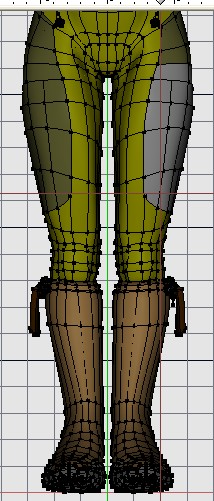
The patch count is partially to define different material boundries and also decal locations for clothing seams. The density around the knees is for extreme bends (heel to butt).
-
Fand-damn-tastic! It woiks!!!

-
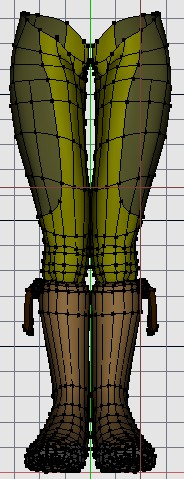
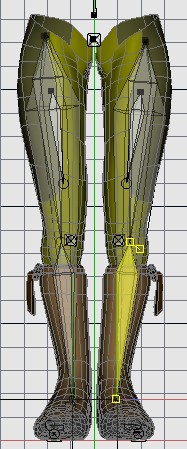
I actually started trying the pose out on myself AFTER I posted. You are correct, it is a "knock kneed" pose which is from a photo reference. I am going to have to move the legs around some and try to get the sculpt to look right. I didn't screen capture the really horrific issue after the constraints, I only posted a modified 'pose' of straighter legs. I will post again soon on my progress. You da man!
-
Hopefully Mike Fitz will see this soon, I have used his basic setup from his free section on my arms - everything went to plan. When I set up my legs - aaaaaaiiiiiiiiiieeeeeeeeeeee!!!!!!!!!!!!!!! I have my model in what is a natural closed leg knees together pose. However, once I assign my constraints it bowed my models knees out in an inhumanly painful position. I tried seeing what my model would look like if the (anatomic bones) ran paralell to the rig the pose looks unnatural. see attached images. Do I have to have my model splined out with the legs going straight down for this set-up to work? Or is there some kind of work around? Thanks-
-
Bravo Mike, is there a chance you could post a couple screen caps of the bone set up. I think I get the drift but Images would help. This might help me with rigging a character I am working on that needs a VERY flexible spine.
-
 For this particular one I would add the points to each spline as I go across - dot, dot, dot, connecting all the splines together and leaving the trailing edges. Then deleting the trailing edges. I would not try to hook this, although I think you can hook up to four (or is it 3?), I would not do it in this case, especially if there will be any further modelling 'out" from the flat edge.
 -
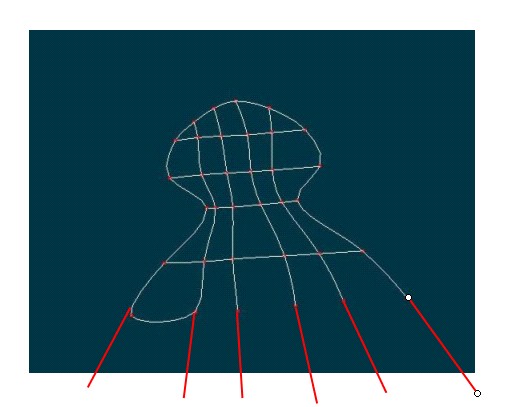
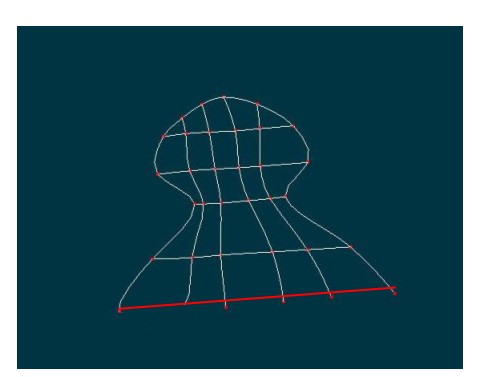
This is a common new user error and I still do it myself when I hurry. The software doesnt know you want a straight edge, the normal condition of a HASH spline is to curve and be organic. Try the following, extend the splines for what looks like a finger area out slightly past where you want to go. (see UN-argh 01.jpg). Next where you want your straight line add a spline (see UN-argh 02.jpg) making sure you attach it to each extended spline as you go across. Next delete the ends of the extended splines (UN-argh 03.jpg). Is this what you wanted?
-
Me again. As I work for a manufacturer of dental restoration materials, I thought I would share some factoids. Teeth are composed of many components, the root, the dentin and the enamel are some. For the most part we can forget about the others like the root and focus on the main two. The dentin is the material underneath the enamel. dentin is semi-translucent but mostly opaque. The enamel is the opposite, mostly translucent. I am experimenting with a way to model more realistic teeth that involves having each tooth made of two models (sets of patches), one inside the other. The outer model would have a degree of translucency and the inner opaque. Also, different teeth have various degrees of where the tooth is most translucent. There is no real need to go to great lengths modelling and texturing human molars as they are in the back of the mouth. Incisors (the pointy ones) have a different translucency ratio than the first front 3 (top/bottom). Also consider that except for cases like those of extreme make overs, teeth are not perfect. They lean one way or another, are not horizontally level, have berry stains, tartar, etc. As a movie prop, the teeth may not be easily distinguished as 'perfect' on this great reptile model so detail on a prop like this would not have been required. For stills, the eye can recognize the perfection and think "hey, this doesn't look right", simply because it lacks imperfection. That is one of the issues with the uncanny valley effect as most 3D humans have perfectly mirrored right & left halfs, this is unnatural and the mind notices. Eyes are not always horizontally centered, mouths are slightly crooked, jaw bones do not always grow mirrored perfectly. Wrinkles are not symmetrical. Perfection for us in the artistic world can more easily be found in imperfection. I have tried to keep this as layman as possible and left out many technical terms on purpose. Please examine opportunities in your experience and share them with the forum. Thanks,
-
Love the work. The bricks could use something to make them look a little less uniform. That said, I do not think I could have done better. Very inspiring!!! I give it a 9.97 out of 10. Fantastic!!!!!!!!!!!!!!!!!!!!!!!!!!!!!!!!!!!!!!!!!!!!!!!!!!!!!!!!!!!1
-
These characters are VERY cute. I have not had much success doing cute, most of my character designs have a very HARD look to them. My wife wishes I was doing cute stuff instead of what I currently do also. very nice style on these two characters, my compliments!! keep up the fine work.
-
AAAAARRRRGH!!!!!! It wouldn't let me download for "virus protection"! Did I say AAAAARRRRGH yet? AAAAARRRRGH!!!!!!!!!!!!!!!!!!!!!!!!!
-
I justify the expense (for myself) in that it pays for itself in increased productivity. Since I build my own PC's I can keep the cost down for the extras. I cannot imagine using a mouse anymore. Best of luck with the tablet you do get.
-
If you can budget it, go Cintiq - the cost is well woth it. My speed in modelling between the mouse and tablet is vastly different.
-
-
My first organic model WIP
UNGLAUBLICHUSA replied to Eric2575's topic in Work In Progress / Sweatbox
Some good reference DVD's walking with dinos & more -
My first organic model WIP
UNGLAUBLICHUSA replied to Eric2575's topic in Work In Progress / Sweatbox
Good start, I couldn't find the T-Rex on my work PC - if I have it at home do you want me to email it to you? In the meantime - here might be some helpful links: trex 1 trex 2 Good luck! -
Thanks for the reply, I visited the radiosity forum earlier this morning and printed all the threads for later reading (and downloaded the attachments). The volume of actual "how to" info on radiosity alone, there could probably make a booklet the size of Art of Animation Master. Yikes, give me my old super 8 and some platicine clay back - I think this is going to be some serious work.
-
Yves, when you said "I just wanted to mention that you really don't need radiosity for that sort of render". It got me thinking, when do you want to use radiosity? Are there some "key" factors that would benefit from radiosity? Thanks for any input.
-
Any chance of some wires on that side view, the shaded view doesn't seem to have more than a subtle change that I could see. Looks great in shaded mode though!
-
Damn, I have been trying to get my nose/cheek area looking right for 3 days now and here you just hand me the solution on a silver platter. Kudos & golf claps 2 u Adam (and thanks)!!
-
Ain't they the cutest Shaggies y'ever saw?
UNGLAUBLICHUSA replied to ZachBG's topic in Work In Progress / Sweatbox
Wow, as far as matching perspective - my opinion is that you have got it right on the money. This gives me some ideas...he he! -
Actually Jon I thought it was for the reason that it would then be illegal for them to post the images without the express written consent of the copyright holder. That might in some way be another good reason. Steve, can you chime in here and settle this.
-
It hardly seems innapropriate to not follow a non rule. I posted mine, not to get votes (I don't see how that would get votes anyway) but to get feedback. Maybe I could have waited, but I worked on it (off & on) for a month and feel a little eager. Maybe someone who knows how to post a "poll" can get a concensus & ask HASH to have a rule implemented. Until then, I say "No rule - no foul". In some other forums it is "good form" to post your project from doodle to final render as you go along, like say "The Machineflesh Challenge" or "Grand Space Opera Challenge". That way seems prefferable to me and is how I went along, but if someone wants to go straight to the showcase thats up to them too. Just my 2 cents.....
-
Darn, another image thats going to whip my ass in the contest, good job! I would only suggest adding some puffy white clouds, but thats a very small thing.
-
I think you will get more votes than me, heres my crit for what its worth: 1. Love the textures (materials), the crackled ground, rusty drum, ruined walls. 2. Nice sky effect and fires. 3. Lighting is dramatic. 4. Abdominals seem squared, I think this might be what Ken was referring to, if you can round the edges that would be nice. Also, on well defined abdominals you will find that they interlock (stagger) somewhat - check out some bodybuilder pics to see what I mean. Good job.